Introduction
Flipkart remains one of India’s largest e-commerce platforms, competing directly with Amazon for the top spot in nearly every major category. For entrepreneurs, small businesses, and established brands, how to sell on Flipkart is one of the highest-value questions in Indian e-commerce — the platform offers genuine reach, a mature logistics network, and seller-support programs that make it a viable growth channel for serious sellers, not just a side project.
This guide walks through the entire process: eligibility, registration, choosing a fulfillment model, listing optimization, advertising, and the growth strategies that separate sellers who plateau from sellers who scale.
Why Sell on Flipkart
Flipkart’s core advantages come down to a few consistent factors: an enormous, established customer base spanning premium buyers to value-conscious shoppers, a mature logistics network (Ekart) that removes much of the fulfillment complexity smaller sellers would otherwise have to solve themselves, and growing seller-support programs aimed specifically at MSMEs and regional brands rather than just large established players. Flipkart also periodically runs seller-friendly commission structures on certain categories and price bands — check current terms directly in Seller Hub, since these programs and thresholds change over time and shouldn’t be assumed to still apply from any past announcement, including ones referenced in older guides.
Eligibility and Documents Required
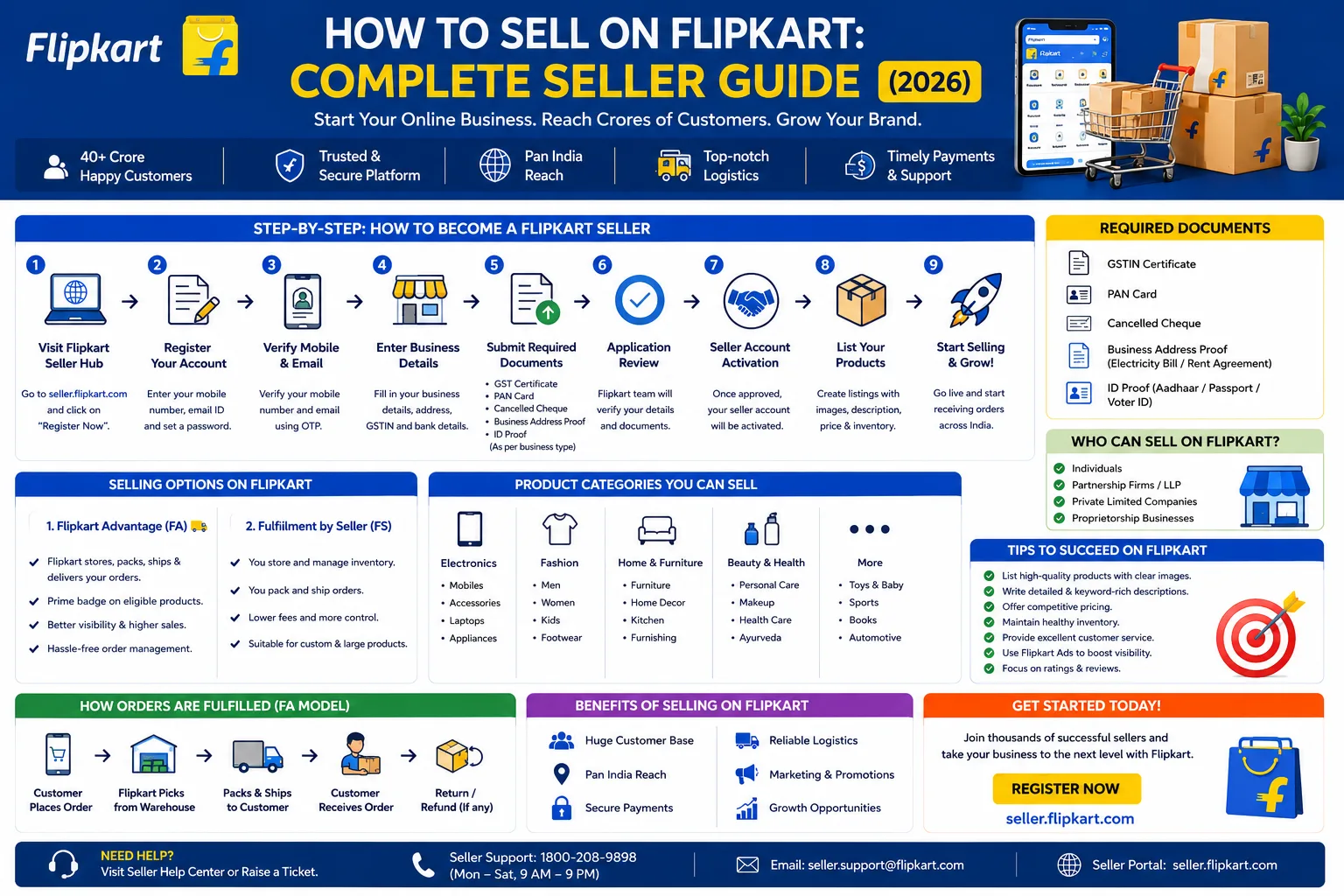
Before registering, gather the following:
- GSTIN — required for most non-exempt product categories
- PAN card — individual or business, matching your GST registration
- Bank account details — for receiving payments, with a cancelled cheque or statement
- Business address proof — utility bill, rent agreement, or ownership document
- Business identity proof — depending on your structure (individual, proprietorship, partnership, company)
Flipkart also supports smaller-scale and artisan sellers with somewhat adjusted documentation paths in certain categories — worth checking current eligibility criteria in Seller Hub if you’re operating at a very small scale, rather than assuming the standard business documentation path is your only option.
Step-by-Step Registration Process
- Visit the Flipkart Seller Hub (seller.flipkart.com) and click “Start Selling.”
- Enter your mobile number and verify with an OTP.
- Provide business details — name, business type, and GSTIN.
- Specify your pickup address — the location Flipkart will collect inventory from.
- Upload required documents — PAN, GSTIN, bank details, and address proof.
- Select your product categories.
- Set up your storefront — store name, logo, and a description that actually communicates what makes your brand worth buying from, not just a generic filler paragraph.
KYC and Bank Verification
Once registered, complete KYC under Settings → KYC & Payments: upload GSTIN, PAN, a cancelled cheque, and any additional identity documents required for your business structure. Fill in your bank details accurately — IFSC code, account number, and account holder name matching your registered business name exactly, since mismatches here are one of the most common causes of delay. Expect approval within roughly 48-72 hours if your documents are clear and consistent; blurry or cropped scans are the most avoidable cause of extended delays.
Choosing Your Fulfillment Model: FBA vs. FBM
Flipkart Advantage (FBA) — you send bulk inventory to Flipkart’s warehouses, and Flipkart handles storage, packing, and delivery. This typically means faster delivery promises to customers and a stronger Buy Box position, at the cost of storage fees and less direct control over packaging presentation.
Seller Fulfilled (FBM) — you handle storage, packing, and shipping yourself, either in-house or through your own logistics partner. This gives you full control over packaging and branding, with the tradeoff of managing fulfillment operations yourself, including scaling that operation during high-traffic periods.
Many established sellers land on a hybrid approach — FBA for fast-moving, high-volume SKUs, and FBM for specialized, bulky, or lower-velocity products — rather than committing entirely to one model from day one.
Creating Your First Listing
Fill in the required fields carefully: SKU, title, MRP, selling price, stock quantity, and HSN code. Upload a clean white-background main image alongside 1-2 genuine lifestyle images that show the product in real use — verify Flipkart’s current image resolution requirements in Seller Hub before uploading in bulk, since exact specs can be updated and it’s worth confirming rather than assuming an older number still applies.
For sellers managing larger catalogs, integrating your ERP or using middleware apps (tools like CedCommerce or similar Flipkart-compatible integrations) keeps inventory and order data synced automatically rather than requiring manual updates across multiple systems — a meaningful time saver once you’re managing more than a handful of SKUs.
Pricing Strategy
Competitive pricing on Flipkart means actively monitoring similar listings in your category, not setting a price once and leaving it static. Factor in Flipkart’s commission structure for your specific category (rates vary meaningfully by category, so check your actual applicable rate rather than assuming a flat percentage across your whole catalog) alongside your fulfillment costs when calculating your real margin — a price that looks profitable before fees can look very different afterward.
Flipkart Advertising: Sponsored Ads
Flipkart’s advertising tools help new listings gain visibility faster than relying on organic ranking alone:
Start with auto campaigns to gather keyword and targeting data before you have enough history to run manual campaigns effectively.
Refine into manual campaigns once you have performance data, targeting high-intent keywords and specific product placements directly.
Use Sponsored Brands to showcase your logo, a custom headline, and multiple products together — useful for building brand recognition, not just individual SKU visibility.
Set a realistic ACOS target for your category and margin structure rather than copying a generic industry benchmark — a commonly referenced starting target for new campaigns is keeping ACOS at or below 25% during the first 30 days while you’re still gathering data, though your actual sustainable target depends heavily on your specific margins.
Running Promotions and Deals
Configure Deals of the Day and Flash Sales under Promotions → Deals, and highlight “You Save” calculations to increase perceived urgency and value. Flipkart’s major sale events — Big Billion Days being the largest — are worth specific preparation: inventory buffer, pricing strategy, and creative should all be locked in well ahead of the event window rather than adjusted reactively once traffic has already started climbing.
Managing Customer Feedback and Ratings
Enable automated feedback requests (commonly found under Engagement → Feedback in Seller Hub, though confirm the current menu path directly) to prompt reviews a few days post-delivery, while the purchase is still fresh in the customer’s mind. Acknowledge positive feedback and respond to negative reviews professionally and promptly — ideally within 24 hours — using a response that offers a real solution rather than a generic templated apology. Consistent, fast response to negative feedback specifically tends to matter more for long-term reputation than the occasional bad review itself.
Common Mistakes New Sellers Make
Treating registration as the finish line rather than the starting point — the real work of listing optimization, pricing discipline, and ongoing account management begins after you’re approved, not before.
Copying generic product descriptions instead of writing genuinely differentiated, keyword-rich content for each listing.
Ignoring account health metrics until they’ve already caused a visible problem, rather than monitoring proactively.
Underestimating fulfillment complexity if choosing FBM without adequate operational capacity to handle order volume, especially during sale events.
Setting and forgetting pricing instead of actively monitoring competitor pricing and adjusting as the market shifts.
Growth Strategies for Scaling
Once your foundational listings and processes are solid, growth tends to come from a combination of expanding into adjacent categories your existing customer base already trusts you for, systematically testing and refining your advertising campaigns rather than running the same setup indefinitely, and building genuine customer loyalty through consistent quality and responsive service rather than treating every sale as a one-off transaction. Sellers who review their performance data regularly — not just during sale events — tend to catch problems and opportunities faster than those who only check in periodically.
Final Thoughts
Selling on Flipkart successfully isn’t about getting through registration — it’s about the ongoing discipline that comes after: pricing strategy, listing quality, advertising refinement, and account health monitoring, sustained consistently rather than set up once and left alone. The sellers who scale treat this as an evolving operation, not a one-time setup project.
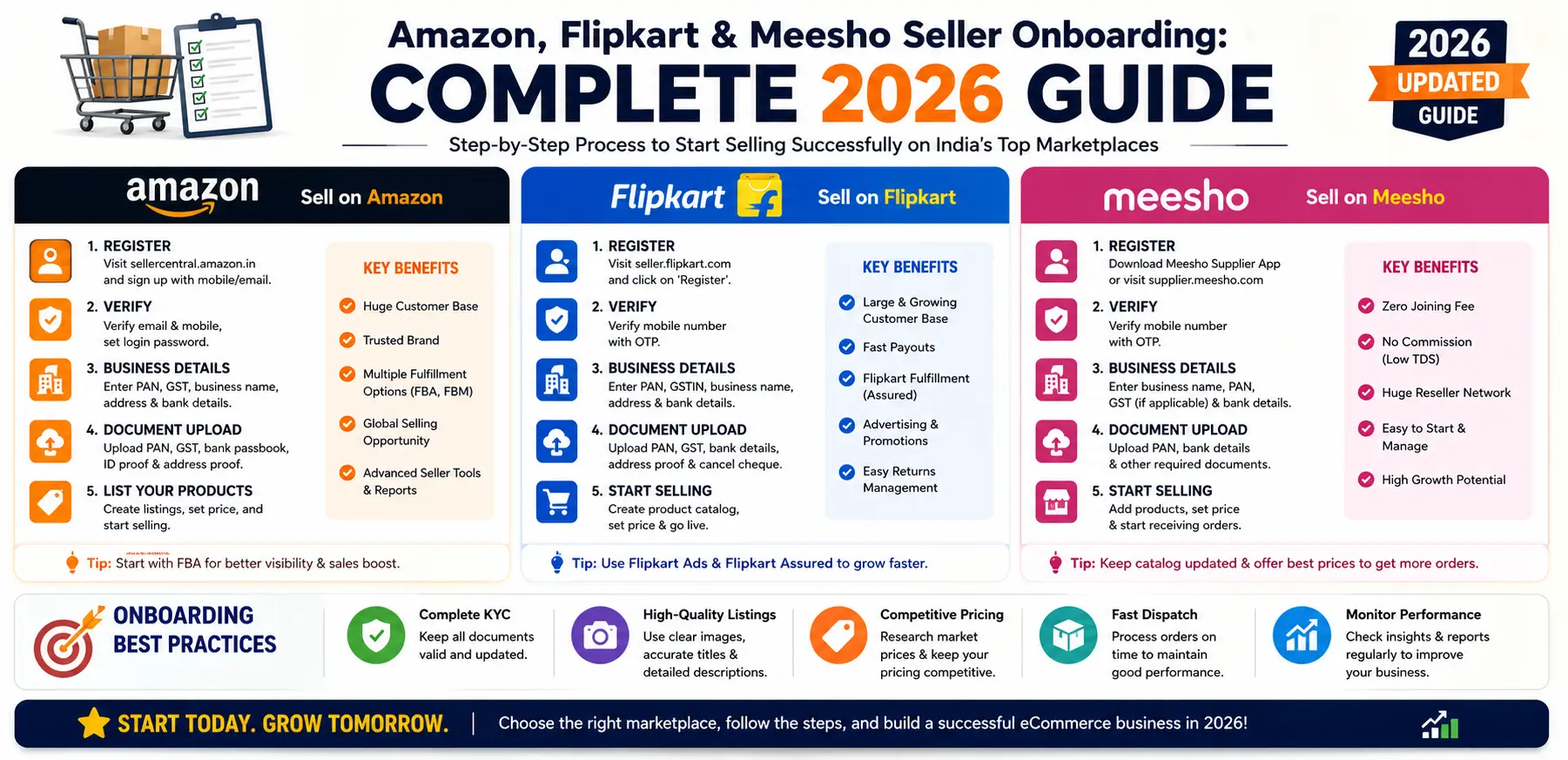
If you’d rather have this handled by a team that manages Flipkart seller operations daily, Sell Technical offers full Flipkart onboarding, account management, listing optimization, and sales boost strategy. If you’re also considering Amazon or Meesho alongside Flipkart, our multi-marketplace onboarding guide walks through how the three compare.
Book a free consultation → or call +91 8882080135.
Frequently Asked Questions
How long does Flipkart seller registration take?
Registration itself takes minutes, but full KYC approval typically takes 48-72 hours if your documents are clear and consistent. Blurry or mismatched documents are the most common cause of delay.
Should I choose FBA or FBM as a new Flipkart seller?
FBA (Flipkart Advantage) offers faster delivery and stronger Buy Box positioning at the cost of storage fees and less packaging control. FBM gives full control but requires you to manage fulfillment yourself. Many sellers eventually run a hybrid model split by SKU velocity.
Do I need a GST number to sell on Flipkart?
Yes, for most non-exempt product categories. Some smaller-scale or artisan seller categories may have adjusted requirements — check current eligibility criteria in Seller Hub for your specific situation.
What's a realistic advertising budget for a new Flipkart seller?
There’s no universal number — it depends heavily on your category and margins. A commonly referenced starting approach is running auto campaigns first to gather data, then refining into manual campaigns with an ACOS target suited to your actual margin structure rather than a generic industry benchmark.
How do I prepare for Flipkart's Big Billion Days as a new seller?
Lock in inventory buffer, pricing strategy, and listing quality well ahead of the event rather than adjusting reactively once the sale has started — the sellers who perform best treat sale-event prep as a multi-week project, not a last-minute scramble.