Introduction
Every year, Google updates its ranking algorithms – making on‑page and technical SEO more critical than ever, and 2026 has added a new wrinkle: structured data and clear entity signals matter more than ever now that AI-generated search summaries pull directly from well-marked-up pages. Choosing the right WordPress SEO plugin for your site can mean the difference between languishing on page 10 and rising to the coveted top spots. In this guide, we’ll walk through the best SEO plugins for 2026, their key features, pricing, and which one is actually right for your site.
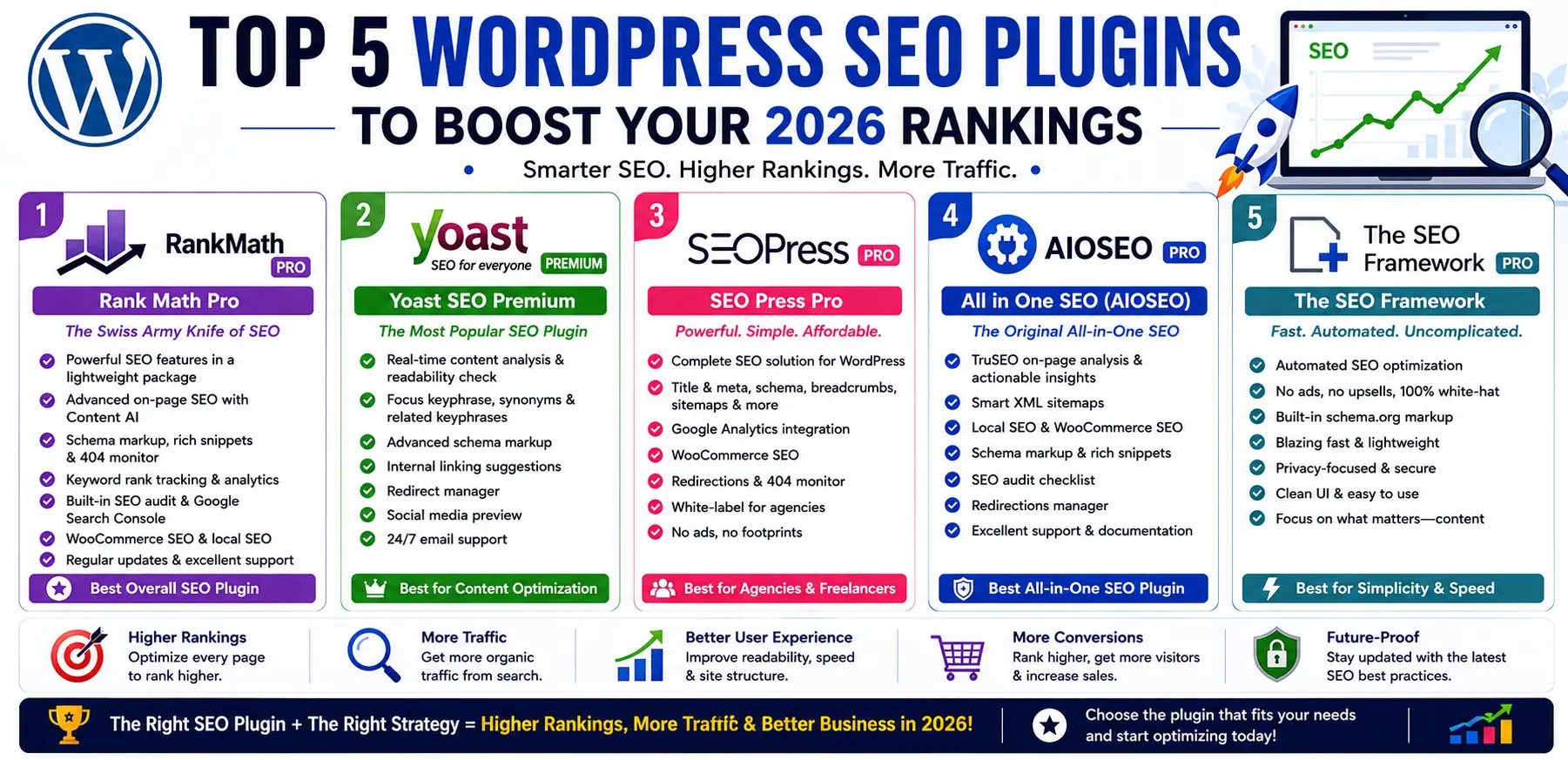
I. Rank Math Pro
Key Features
- AI‑Powered Content Analysis: Real‑time suggestions for keyword usage, readability, and internal linking
- Schema Generator: Supports 20+ schema types—including Service, FAQ, and HowTo—without addons
- Advanced Redirection Manager: 301, 302, and 410 redirects with automatic 404 monitoring
- Local SEO Module: Optimizes your Google Business Profile data and local schema
- Modular Architecture: Enable only the features you need for lean performance
Pricing
Free version with most core features unlocked, Pro and Business/Agency tiers available — confirm current pricing and site limits directly on rankmath.com, as tiers have shifted since this was last checked.
Why We Love It
Rank Math’s intuitive setup wizard and deep integration with both WordPress and Google Search Console make it a one‑stop solution – ideal for agencies and power users who demand performance without bloat, and its schema depth matters even more now that AI search summaries lean heavily on structured data.
II. Yoast SEO Premium
Key Features
- Cornerstone Content: Identify and promote your most important posts
- Internal Linking Suggestions: AI‑powered prompts right in the editor
- Redirect Manager: Seamless 301 redirects when you delete or change URLs
- Multiple Keyword Optimization: Optimize for up to 5 keyphrases per page (Premium only)
- Schema Enhancements: Basic schema out of the box plus social profiles
Pricing
Free version covers core on‑page analysis and XML sitemaps; Premium is a paid annual license per site — verify current pricing on yoast.com before publishing.
Why We Love It
Yoast’s long‑standing reputation, frequent updates, and user‑friendly interface make it a top choice for beginners and those migrating from basic builtin SEO.
III. SEO Press Pro
Key Features
- White‑Label Interface: Perfect for agency branding
- Breadcrumbs & Sitemaps: HTML, XML, video, news, and image sitemaps
- Schema Pro: Deep support for rich snippets (local business, recipes, events)
- WooCommerce SEO: Product breadcrumbs, structured data, and social share images
- Google Analytics Integration: Track UTM campaigns and download behavior within WordPress
Pricing
Free version supports unlimited sites with essentials included. Pro is a flat annual fee — confirm current site-count limits on seopress.org, as this has been reported differently across sources.
Why We Love It
SEOPress’s flat‑rate pricing model and lightweight footprint deliver strong value for small agencies and freelancers managing multiple client sites.
IV. All in One SEO (AIOSEO)
Key Features
- Smart XML Sitemaps: Automatically notifies Google & Bing of changes
- Link Assistant: Finds and suggests internal and external linking opportunities
- Local SEO Addon: Google Maps integration, local business schema, and store locator
- eCommerce SEO: Product schema, rich snippets, and WooCommerce integration
- Performance Manager: Loads modules as needed to minimize overhead
Pricing
Free version includes basic on‑page tools and sitemaps; paid tiers scale by site count and feature depth — confirm current tier pricing on aioseo.com.
Why We Love It
V. The SEO Framework
Key Features
- Lightweight & Fast: Built to meet WordPress performance standards
- AI‑Generated Descriptions: Automated, context‑aware meta descriptions
- Critical CSS Integration: Ensures your SEO plugin doesn’t slow you down
- Structured Data Out of the Box: Article, breadcrumb, and blogposting schemas
- Extension Manager: Add local SEO, AMP, and social meta modules as needed
Pricing
Free core plugin is fully functional; an extensions bundle unlocks premium features — confirm current bundle pricing on theseoframework.com.
Why We Love It
If you value speed above all, The SEO Framework’s lean codebase and granular controls make it the go‑to for developers and performance‑obsessed site owners.
How to Choose the Right Plugin for You
| Plugin | Best For | Ideal Use Case |
| Rank Math Pro | Agencies & Power Users | Multi-site management, deep SEO automation |
| Yoast SEO Premium | Beginners & Bloggers | Easy onboarding, strong community support |
| SEOPress Pro | Agencies & Freelancers | White-label projects, unlimited sites |
| AIOSEO | eCommerce & SMBs | WooCommerce stores, local business optimization |
| The SEO Framework | Developers & Performance Fans | Speed-critical sites, lightweight footprints |
A quick note: you only need one all-in-one SEO plugin running at a time — installing two in parallel causes conflicting sitemaps and duplicate schema output more often than it adds value.
Getting Started in 2026
- Backup Your Site: Always back up before installing or switching plugins.
- Run an Audit: Identify your existing gaps — titles, meta, schema, speed, and Core Web Vitals specifically, since these carry more ranking weight than they did even a year ago.
- Install & Configure: Use the plugin’s setup wizard and follow platform‑specific guides.
- Monitor & Refine: Set up Google Search Console, track keyword rankings, and refine your settings monthly rather than setting it up once and forgetting it.
Final Thoughts
The “best” WordPress SEO plugin genuinely depends on what you’re running — an agency managing dozens of client sites has different needs than a solo blogger or a WooCommerce store selling directly to customers. What matters more than which logo you pick is actually using the plugin deliberately: keeping schema current, monitoring Search Console monthly, and treating the plugin as one layer of a broader strategy rather than the whole strategy itself.
Let Us Handle Your SEO
If you’d rather focus on your business while experts handle your SEO, Sell Technical offers full technical SEO audits, on-page and off-page optimization, content strategy, and schema implementation as part of our SEO & SMO optimization services — and if you need the underlying site itself built right, our website development team handles that too.
FAQs - WordPress SEO Plugins
Do I need a paid SEO plugin, or is the free version enough?
For smaller sites, free versions of Rank Math, Yoast, or SEOPress cover the core basics well. Paid tiers become worthwhile once you need advanced schema types, multi-keyword optimization, or agency-level site management.
Can I run two SEO plugins at the same time?
No — running two full SEO plugins simultaneously typically causes conflicting sitemaps and duplicate schema markup. Pick one as your primary plugin.
Which plugin is best for an e-commerce or WooCommerce site?
AIOSEO and SEOPress both have strong WooCommerce-specific features, including product schema and structured data built for online stores.
Does an SEO plugin replace the need for a broader SEO strategy?
No. A plugin handles the technical layer — sitemaps, schema, meta tags — but keyword strategy, content quality, and site structure still require deliberate planning beyond what any plugin automates.
Will switching SEO plugins hurt my existing rankings?
It can, if done carelessly — mismatched redirects or lost meta data during a switch cause temporary ranking dips. Back up your site and carefully migrate settings rather than deactivating one plugin and activating another without a transition plan.