Introduction
Increasing organic traffic to your Shopify store starts with understanding something most sellers get wrong: Shopify handles a meaningful chunk of technical SEO automatically, but “handles the basics” isn’t the same as “fully optimized.” Shopify SEO optimization is really about knowing exactly where Shopify’s automation stops and your manual work needs to start — and that line is different from WordPress, Magento, or any other platform, since Shopify’s specific architecture creates its own quirks and constraints.
This guide covers what Shopify does for you out of the box, what you need to actively manage yourself, and the platform-specific details generic SEO advice tends to skip entirely.
What Shopify Already Handles for You
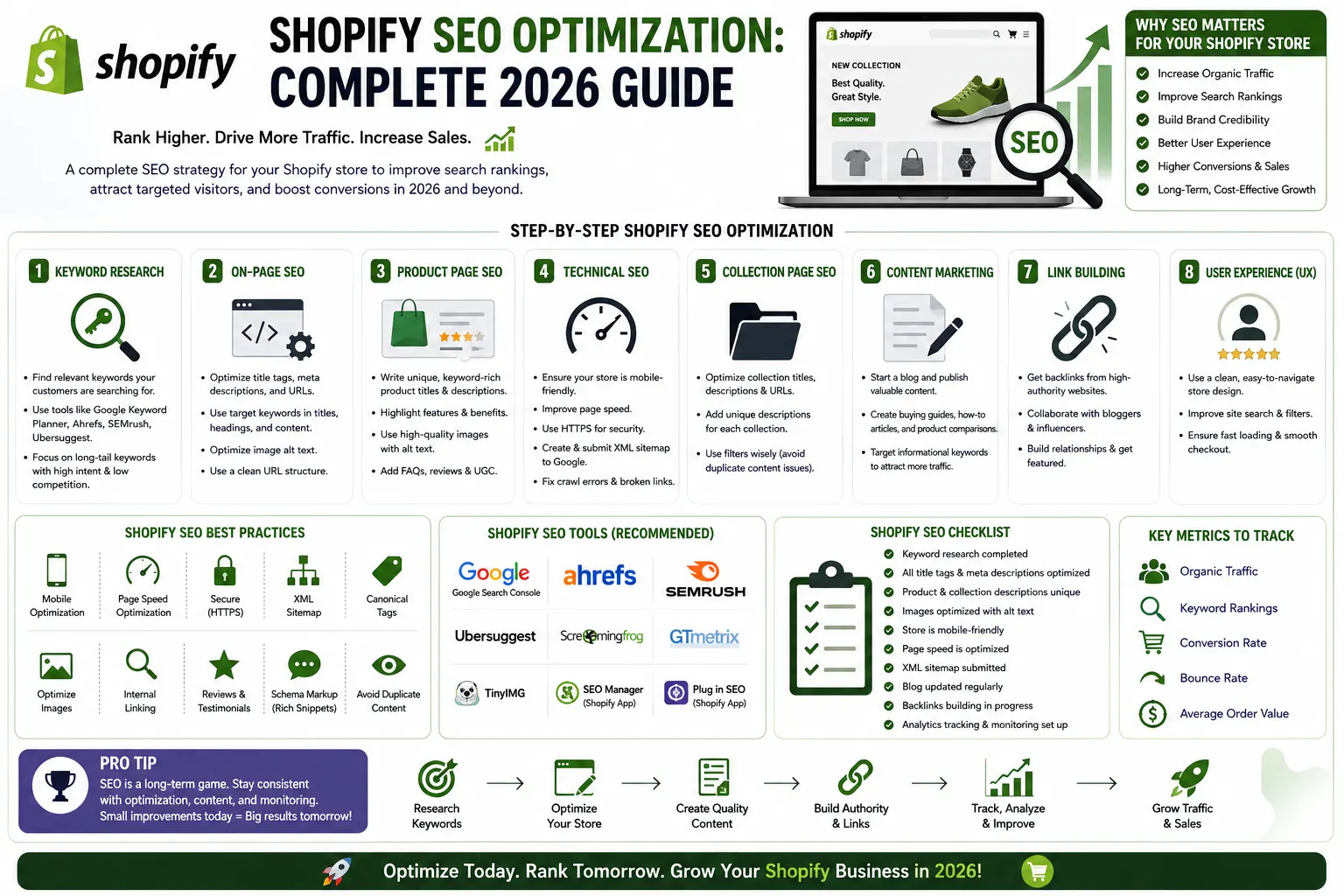
Shopify’s built-in infrastructure covers several core technical tasks automatically: clean, crawlable site architecture, automatically generated XML sitemaps, canonical tags that help prevent duplicate content issues, and reasonably fast baseline hosting performance via its CDN. This is a real advantage over a self-hosted platform where you’d need to configure all of this manually — but it also means sellers sometimes assume “Shopify is SEO-friendly” translates to “my store is optimized,” which isn’t the same thing at all.
What You Still Need to Optimize Manually
Everything content and structure-related is still on you: page titles and meta descriptions, image alt text, URL slugs for products and pages, internal linking, content depth on collection and product pages, and app bloat management. None of this happens automatically just because you’re on Shopify.
Shopify-Specific Quirks Most Guides Don't Mention
You can’t fully customize collection and blog URL structures. Shopify enforces /collections/ and /blogs/ prefixes by default — a real constraint compared to platforms with fully flexible permalink structures. Product and page URLs remain editable, so focus your URL-cleanup effort there instead of fighting a structural limitation you can’t remove.
Collection pages are underused as an SEO asset. Most Shopify stores treat collection pages as pure product grids with no actual content — a missed opportunity, since a collection page targeting a broad category keyword (“men’s running shoes”) with genuine descriptive copy above or below the grid can rank for exactly the kind of high-volume, broader-intent searches product pages are too specific to capture.
Apps are the single most common cause of Shopify stores slowing down. Every installed app adds scripts that can drag down load time, and unlike a lean custom build, it’s easy to accumulate apps over time without auditing which ones are still earning their keep. A quarterly app audit — genuinely asking whether each one still justifies its performance cost — is worth the discipline.
Theme choice affects SEO more than sellers expect. A bloated, poorly coded theme creates the same performance drag as too many apps, just baked in at a more fundamental level. Lightweight, well-maintained themes consistently outperform feature-heavy ones on Core Web Vitals.
Core Web Vitals and Speed on Shopify
Google’s Core Web Vitals directly factor into ranking, and Shopify stores are not automatically exempt from performing poorly here. Practical steps that make a real difference: compress images before uploading rather than relying on Shopify to do it for you, use responsive image sizing and lazy loading for anything below the fold, and remove unused apps and scripts rather than just deactivating them (deactivated apps can still leave code behind). Aim for load times under three seconds — beyond that threshold, both rankings and conversion rates measurably decline together, not independently.
On-Page SEO Fundamentals for Shopify
Titles and meta descriptions should be written for every product and collection page individually — Shopify’s defaults auto-generate from your page title, which is a reasonable fallback but rarely as compelling or keyword-targeted as something written deliberately.
Image alt text matters both for accessibility and for image search visibility — describe what’s actually in the image rather than stuffing it with keywords disconnected from the visual content.
Internal linking between related products and collections helps both users and search engines understand your catalog’s structure — Shopify doesn’t do this for you automatically beyond basic navigation menus.
Setting Up the Tools You Actually Need
Before optimizing individual pages, get the measurement layer in place: install Google Analytics 4 to track traffic and behavior, connect Google Search Console to monitor indexing and search performance, and if you haven’t already, move off a myshopify.com subdomain onto a custom domain — a subdomain limits both your brand credibility and your SEO flexibility in ways that are easy to overlook until you’re trying to fix it later.
Content Strategy: Where Shopify Stores Leave the Most on the Table
Product and collection pages alone rarely carry a full SEO strategy — supporting blog content that targets informational, higher-funnel searches (buying guides, comparisons, use-case content) extends your reach to shoppers who aren’t ready to buy yet but will be soon. Stores with genuinely active, well-structured blogs consistently outperform those without one on organic traffic over time, since blog content compounds in a way product pages with limited natural search volume don’t.
Preparing for AI-Driven Search
Search behavior is shifting — a meaningful and growing share of queries now trigger AI-generated summaries rather than a traditional list of blue links. Optimizing for this doesn’t require abandoning traditional SEO; it means writing clearer, more direct-answer content, using FAQ-style subheadings that mirror how people actually ask questions, and implementing FAQ schema markup where relevant. Content built this way tends to perform well in both traditional search and AI-summary contexts, rather than requiring two separate strategies.
Common Shopify SEO Mistakes
Leaving default, auto-generated titles and meta descriptions unedited across the whole catalog. Treating collection pages as empty product grids with zero supporting content. Letting apps accumulate without ever auditing which ones still matter. Skipping a custom domain and staying on a myshopify.com subdomain long-term. And publishing product pages with minimal, spec-only descriptions that don’t actually target how real buyers search.
Final Thoughts
Shopify SEO optimization isn’t about fighting the platform — it’s about knowing precisely where its automation ends and stopping there with generic assumptions. Collection pages, app discipline, custom domains, and genuinely useful supporting content are where most of the real, controllable opportunity sits. If you’re also managing a WooCommerce or other platform store, our broader e-commerce website SEO guide covers the platform-agnostic fundamentals that apply everywhere.
If keeping up with all of this alongside running your actual business feels like too much, Sell Technical‘s SEO & SMO optimization services and website development team handle Shopify SEO end to end — technical audits, content strategy, and ongoing optimization.
Book a free consultation → or call +91 8882080135.
FAQs - Shopify SEO Optimization
Does Shopify handle SEO automatically?
Shopify handles core technical infrastructure — sitemaps, canonical tags, crawlable architecture — automatically. Content, titles, meta descriptions, and structure still require manual, ongoing work.
Can I change Shopify's collection and blog URL structure?
No — Shopify enforces /collections/ and /blogs/ prefixes by default. Product and page URLs remain editable, so focus URL optimization there instead.
Why is my Shopify store slow?
Too many installed apps (including deactivated ones that leave code behind) and a bloated theme are the most common causes. A quarterly app audit is one of the highest-leverage fixes available.
Should I use a custom domain instead of myshopify.com?
Yes — a custom domain improves both brand credibility and long-term SEO flexibility compared to staying on a Shopify subdomain.
Do collection pages need content, or just products?
Genuine descriptive content on collection pages — not just a product grid — helps them rank for broader category searches that individual product pages are too specific to capture.
How should I prepare my Shopify store for AI-driven search results?
Write clear, direct-answer content with FAQ-style subheadings that mirror real search questions, and implement FAQ schema where relevant — this tends to perform well in both traditional and AI-summary search contexts.